

How to Add Money to Media Network Wallet – Complete Step-by-Step Guide
Introduction
If you want to unlock full features on Media Network — like promotions, lotteries, or exclusive options — you need to add money to your wallet. The good news is, it's a very simple process. In this article, you'll learn step-by-step how to add money (or points) to your Media Network wallet safely and easily.
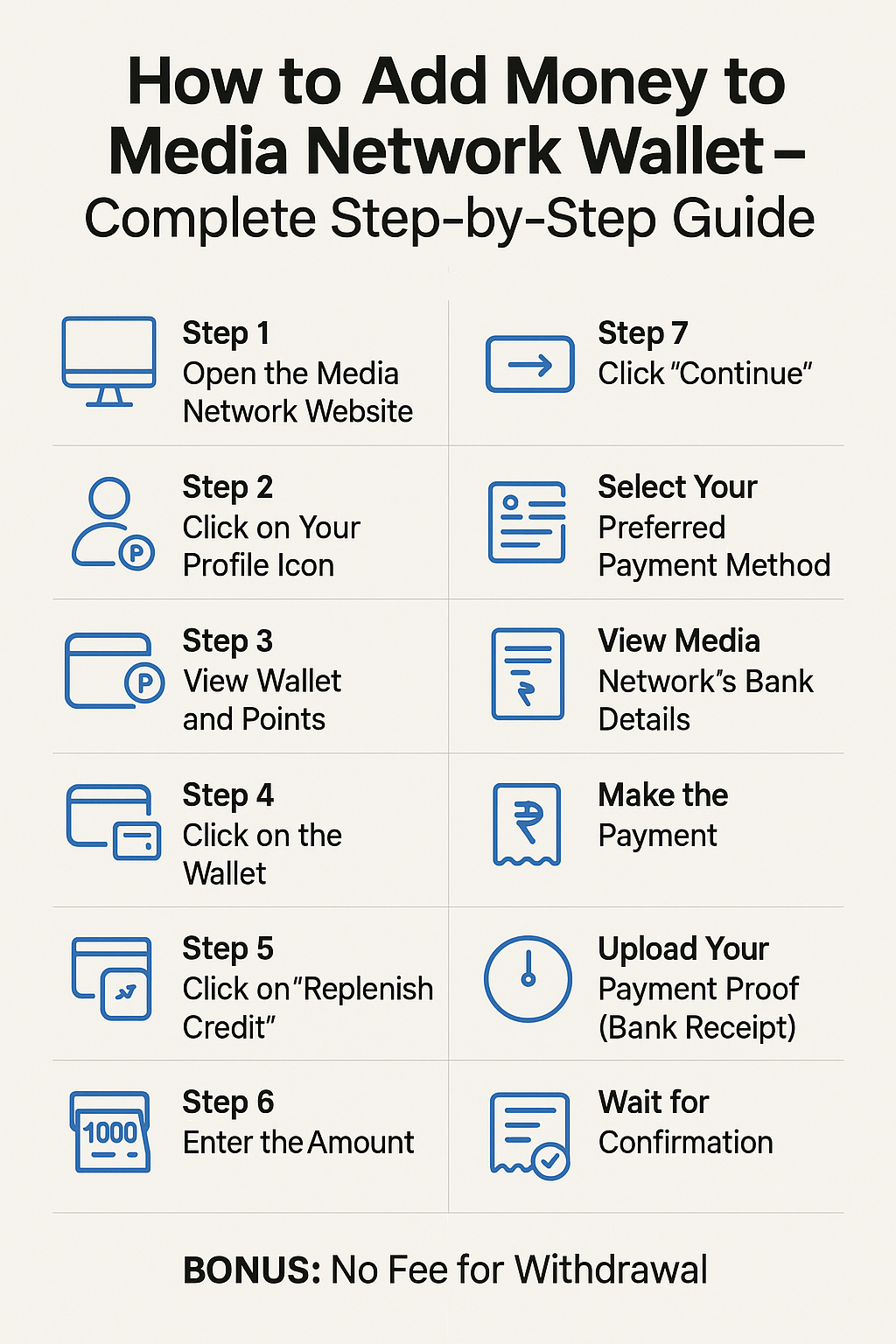
Step-by-Step: How to Add Money to Your Wallet
Step 1: Open the Media Network Website
Go to the official Media Network website:
👉 https://media.biographypoints.com/
Step 2: Click on Your Profile Icon
On the top right of the screen, you’ll see your profile icon. Click on it to open your personal dashboard.
Step 3: View Wallet and Points
In your profile dashboard, you will see the "Wallet" and your current "Points".
💡 Reminder:
1 Point = 1 PKR (Pakistani Rupee)
Step 4: Click on the Wallet
Click on the wallet area to start the top-up process.
Step 5: Click on "Replenish Credit"
On the wallet page, you will see a button labeled “Replenish Credit”. Click on it to move to the next step.
Step 6: Enter the Amount
Enter the amount of money you want to add. For example: 100, 500, 1000 PKR, etc.
Step 7: Click "Continue"
After entering the amount, click the “Continue” button. The system will now show you the available payment methods.
Step 8: Select Your Preferred Payment Method
Choose a method you prefer to make the payment. For example:
-
Bank Transfer
-
Easypaisa / JazzCash
-
Local payment gateway options (if available)
Step 9: View Media Network’s Bank Details
You will be shown the official bank account name and number of Media Network. Make sure to carefully note these details.
Step 10: Make the Payment
Now transfer the money using your selected method.
✅ Double-check the Account Title and Number before sending to avoid errors.
Step 11: Upload Your Payment Proof (Bank Receipt)
After making the payment, take a screenshot or photo of your bank receipt. Then, go back to the wallet page and upload your receipt as proof.
Step 12: Wait for Confirmation
Once your receipt is verified, the wallet will be updated with the amount you added, shown as Points.
Bonus: No Fee for Withdrawal
Whenever you decide to withdraw your wallet balance, it’s 100% free.
There is no tax, no hidden charge on withdrawal.
Conclusion
Adding funds to your Media Network wallet is a fast and safe process. Just go to your profile, select "Replenish Credit", choose a payment method, make the payment, and upload the receipt. Your balance will be added quickly — and remember, 1 point = 1 PKR.
If you face any issues during the process, feel free to contact the Media Network support team.


Categories
Read More
How To Download the Media Network App? Media Network is a modern, secure social media platform that lets you share your thoughts, content, and ideas with the world. If you're looking to download the Media Network app on your smartphone, here are 3 easy and trusted methods to get started. 1. Download via Media Network Website (Play Store Button) When you visit the official Media Network website...

Introduction If you want to unlock full features on Media Network — like promotions, lotteries, or exclusive options — you need to add money to your wallet. The good news is, it's a very simple process. In this article, you'll learn step-by-step how to add money (or points) to your Media Network wallet safely and easily. Step-by-Step: How to Add Money to Your Wallet Step 1:...
📜 Introduction In today’s fast-paced digital world, social media has become an essential part of our lives. From connecting with friends to promoting businesses, social platforms have transformed how we communicate and share information. At the heart of these platforms lies something simple yet powerful — the social media post. Whether it’s a photo on Instagram, a video on...

In a world where the internet connects people from every corner of the globe, language should never be a barrier. Social platforms that understand this need naturally attract more diverse, active, and loyal audiences. Media Network is one of those platforms that believes in giving every user a voice in their own language. By supporting a wide range of international languages, Media Network...
In today’s fast-paced digital world, staying connected is important, but staying safe while being connected is even more important. Every day, millions of people share their photos, thoughts, videos, and personal moments on social platforms. But the question is: How secure is your data? That’s where Media Network stands out. In this article, we’ll explain what social security...