

Social Security on Media Network: Stay Safe, Stay Connected!
In today’s fast-paced digital world, staying connected is important, but staying safe while being connected is even more important. Every day, millions of people share their photos, thoughts, videos, and personal moments on social platforms. But the question is: How secure is your data?
That’s where Media Network stands out. In this article, we’ll explain what social security on Media Network means, how your personal information is protected, and what steps you can take to keep yourself secure while enjoying your social media experience.
📌 What is Social Security in Social Media?
Before we get into Media Network’s features, let’s first understand what social security actually means in the world of social networking.
In simple words:
Social security on a social media platform is about protecting your personal data, privacy, and online identity while you use the platform to connect with people.
It includes:
-
Keeping your personal details safe
-
Preventing unauthorized access to your profile
-
Protecting your conversations, photos, and videos
-
Giving you control over who can see your content
-
Blocking unwanted users and fake profiles
And Media Network takes all these things very seriously.
🔒 How Media Network Keeps Your Data Secure
At Media Network, your security is our top priority. That’s why we’ve built a system that uses advanced tools and privacy controls to keep your personal data protected at all times.
Here’s how:
✅ End-to-End Privacy Controls
You have complete control over who can see your posts, reels, photos, videos, and personal information. You can choose between:
-
Public
-
Friends Only
-
Private
Change your privacy settings anytime from your account panel.
✅ Secure Media Storage with Cloudflare R2
Your uploaded files — whether photos, videos, or documents — are stored on Cloudflare R2, one of the safest and fastest cloud storage services globally. This ensures that your content remains protected from data theft, hacking, and server issues.
✅ Hide from Search and Suggestions
Want to stay private? You can turn on the option to hide your profile from suggestions and search results. This way, only the people you allow can see your profile.
✅ Strong Login & Password Protection
Media Network encourages every user to set a strong password and enables:
-
Show/Hide password option while logging in
-
Secure password encryption
-
Password complexity recommendations
-
Two-Factor Authentication (coming soon)
Your login details are encrypted and stored safely.
📌 What You Can Do to Stay Safe on Media Network
While Media Network ensures maximum safety, you can also take some simple steps to keep your profile extra secure:
🔹 Set a Strong Password
Use a password with a mix of uppercase, lowercase, numbers, and special characters. Avoid using your name or birthday as a password.
🔹 Avoid Sharing Sensitive Information
Never share your personal contact number, address, or bank details in public posts or comments.
🔹 Control Who Can Message You
In your privacy settings, choose whether anyone can message you or only your friends and followers. This reduces unwanted messages from strangers.
🔹 Report Suspicious Accounts
If you come across a fake or harmful profile, use the Report option immediately. Media Network’s team will review and block such profiles to keep the community clean and safe.
🔹 Use the Block Feature
If someone is bothering you, don’t hesitate to block them. Once blocked, they won’t be able to view your posts, message you, or interact with your profile.
📣 New Security Features on Media Network
Recently, Media Network added more features to enhance your safety:
📌 Censored Domain Protection
Any dangerous or harmful external links are automatically blocked by Media Network, protecting you from malware and scam websites.
📌 Paid Live Streaming Privacy
You control who can access your Paid Live Streams. Limit access to invited people only or lock your live sessions with a password.
📌 Reels Access Control
Decide whether your reels should be visible to everyone, only logged-in members, or just your followers.
📌 Hide Profile Activity
Now you can choose to hide your recent activity like likes, comments, and profile updates from other users.
📱 Stay Secure on Mobile Too!
Whether you’re using Media Network’s mobile website or installing it as a Progressive Web App (PWA) on your phone — your data stays equally protected.
-
End-to-end media encryption
-
No third-party access to your private data
-
No forced permissions for contacts, gallery, or location
-
Encrypted messaging for private chats
Media Network ensures that your mobile experience is as safe as on a desktop.
🌐 Why Social Security Matters on Media Network
Your social media account is your digital identity. It represents your personality, ideas, and personal moments. Losing access to it or getting hacked can be stressful.
That’s why Media Network puts user safety first:
-
To prevent fake profiles
-
To protect private conversations
-
To safeguard personal media files
-
To offer a harassment-free environment
-
To give you full control over your online life
We believe in giving power to our users — to choose, to control, and to feel safe.
📢 Final Thoughts
The internet is filled with risks, but Media Network makes sure you stay secure while enjoying every moment online. From encrypted cloud storage to privacy controls, reporting tools, and password protection — every feature is designed with your safety in mind.
So if you want a safe, reliable, and secure social platform where you can connect, share, and earn without risking your privacy — Media Network is your perfect destination.
Join today, set up your privacy preferences, and experience a digital world where your safety matters!

Categories
Read More
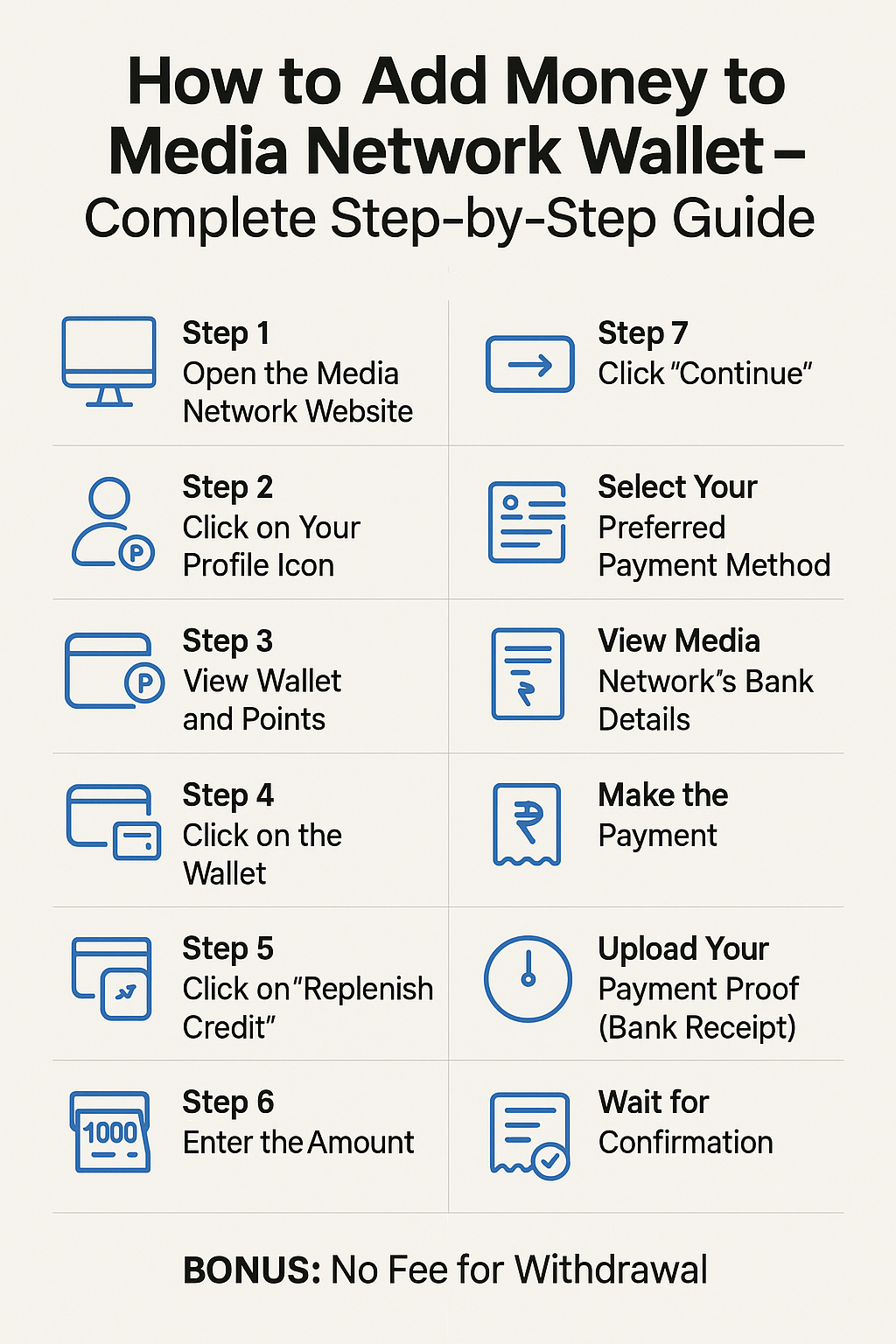
Introduction If you want to unlock full features on Media Network — like promotions, lotteries, or exclusive options — you need to add money to your wallet. The good news is, it's a very simple process. In this article, you'll learn step-by-step how to add money (or points) to your Media Network wallet safely and easily. Step-by-Step: How to Add Money to Your Wallet Step 1:...
In today’s fast-paced digital world, staying connected is important, but staying safe while being connected is even more important. Every day, millions of people share their photos, thoughts, videos, and personal moments on social platforms. But the question is: How secure is your data? That’s where Media Network stands out. In this article, we’ll explain what social security...
How To Download the Media Network App? Media Network is a modern, secure social media platform that lets you share your thoughts, content, and ideas with the world. If you're looking to download the Media Network app on your smartphone, here are 3 easy and trusted methods to get started. 1. Download via Media Network Website (Play Store Button) When you visit the official Media Network website...

📜 Introduction In today’s fast-paced digital world, social media has become an essential part of our lives. From connecting with friends to promoting businesses, social platforms have transformed how we communicate and share information. At the heart of these platforms lies something simple yet powerful — the social media post. Whether it’s a photo on Instagram, a video on...
In a world where the internet connects people from every corner of the globe, language should never be a barrier. Social platforms that understand this need naturally attract more diverse, active, and loyal audiences. Media Network is one of those platforms that believes in giving every user a voice in their own language. By supporting a wide range of international languages, Media Network...